
개요
필자는 현재 Gabriel-Dropout이라는 유저네임을 사용하고 있다.
깃허브의 readme.md를 보면 알겠지만, 그냥 당시 재밌게 보던 애니메이션 이름을 따왔을 뿐인 평범한 이름이다.
그런데 계정을 새로 만들 일이 생겼다.
레어닉을 선점해 보자.

과정
임의의 문자열이 주어졌을 때, 그 문자열을 Github의 유저네임으로 선점할 수 있는지를 판단해야 한다.
힌트는 회원가입 페이지.
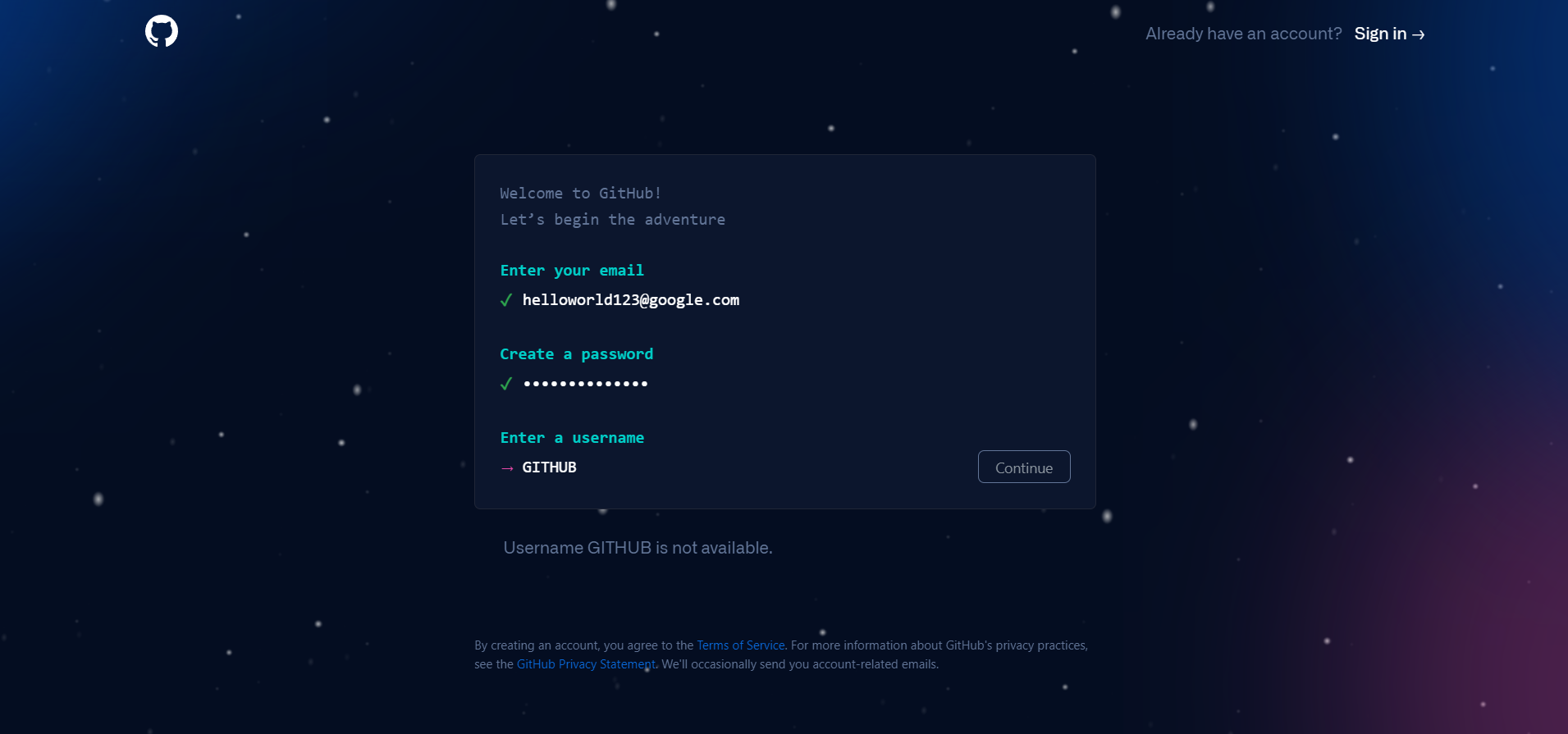
이렇게 원하는 유저네임을 입력했을 때 아래에 유효성을 표시해 준다.
F12를 눌러 리퀘를 따자
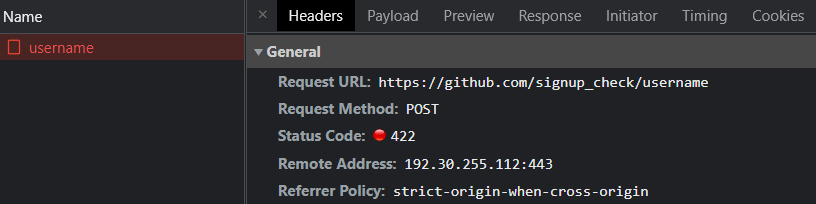
post형식의 리퀘스트를 보내고 있다. 페이로드까지 모조리 복사해서 파이썬으로 동일한 요청을 보내보자.
Request를 우클릭해서 Node.js 코드로 바로 복사할 수 있는데, 이를 활용하면 편하다.
불필요한 쿠키를 삭제하고 나면 다음 코드가 남는다.
import requests
url = 'https://github.com/signup_check/username'
headers = {
    "content-type": "multipart/form-data; boundary=----WebKitFormBoundaryolPN1K4olKp3qv39",
    "cookie": "_gh_sess=icP8ZP2re..."
}
data = "------WebKitForm...GITHUB..."
res = requests.post(url, data=data, headers=headers)
print(res.text)

###RESULT###
<div class="m-1">
  <div class="mb-1">
    Username GITHUB is not available.
  </div>
</div>
잘 된다.
서칭
이제 원하는 문자열을 생성하고 깃허브 서버를 괴롭히는 일만 남았다.
반복적인 요청은 서버를 아프게 하기 때문에, 몇 번 시도하다 보면 몇 초간 막히곤 한다.
그러므로 클라우드 서버에 올려서 작업을 진행했다.
3글자 단어
숫자와 영어 대문자로 구성된 임의의 3글자 스트링을 만들고 이를 전부 확인한다.
너무 많은 요청을 보냈을 때 429 status code가 반환되는데, 이를 확인하면 5초간 대기하는 기능,
유효한 값을 찾았을 때 validTextList.txt에 저장하는 기능,
의도치 않게 종료되었을 때 마지막으로 찾은 유효한 값부터 다시 시작하는 기능
을 탑재하고 있다.
import requests
import time
from itertools import product

# 기본 정보
url = 'https://github.com/signup_check/username'
headers = {
    "content-type": "multipart/form-data...",
    "cookie": "_gh_sess=icP8ZP2..."
}
data_head = "------WebKitForm..."
data_tail = "......Kp3qv39--\r\n"

# 유효성 검사 함수
def isValid(username):
    data = data_head + username + data_tail
    res = requests.post(url, data=data, headers=headers)
    return res.status_code

# 3글자 단어 리스트
ascii = list(range(48,58))+list(range(65,91))
word = [chr(i) for i in ascii]

# 기존 체크 목록 확인
print('Reading Previous List...')
with open('validNameList.txt', 'r') as f:
    prevList = f.readlines()
for i in prevList:
    print(i.strip(), end = ', ')
if prevList and len(prevList[-1].strip()):
    flag=True
    lastText = prevList[-1].strip()
    print('the last one is '+lastText)
else:
    flag=False
    print('there\'s no previous data')
print('Finding New Data...')


for i in product(word, repeat=3):
    text = ''.join(i)
    if flag:  # 이전 마지막 상태까지 스킵
        if text==lastText:
            flag=False
        continue
    print('Checking '+text, end=' -> ')
    while (valid:=isValid(text))==429:  # 너무 많은 요청
        print('[Warning] server blocked this session. wait 5 seconds.')
        time.sleep(5)

    if(valid==200):  # 유효한 값
        with open('validNameList.txt', 'a') as f:
            f.write(text+'\n')
        print('VALID')
    else:
        print('invalid')
4글자 단어
4글자로 된 임의의 문자열은 상당수 유효했으므로 좀 더 의미있는 단어가 필요했다.
위의 사이트에서 4글자로 된 그럴싸한 영단어를 찾을 수 있다. 총 5,332개가 있는 것으로 보인다. 크롤링 코드는 아래처럼 작성했다.
import requests
from bs4 import BeautifulSoup, Tag

# 페이로드 구성
url = 'https://www.thewordfinder.com/wordlist/all/'
payload = {
    'dir':'descending',
    'field':'wwf-score',
    'pg':1,
    'size':4,
}

# 반복 요청
wordList = []
for i in range(1, lastPage+1):
    payload['pg']=i
    res = requests.get(url, params=payload)
    soup = BeautifulSoup(res.text, 'html.parser')
    text = soup.find('ul', class_='clearfix')
    for j in text.find_all(recursive=False):
        wordList.append(j.find().find().text)

# 저장
with open('wordList.txt', 'w') as f:
    for i in wordList:
        f.write(i+'\n')
이 wordList를 바탕으로 다시 탐색을 수행했다. 코드는 3글자일 때의 그것과 별반 다르지 않다.
5글자 단어
5글자까지는 레어닉으로 쳐줄 수 있지 않을까. 똑같이 진행했다.
결과
3글자 리스트
04Q, 06H, 06V, ... YB0, Z9Q
(총 81개, 작성일 기준)
4글자 리스트
EWKS, OYER
(총 2개, 작성일 기준)
5글자 리스트
UPBYE, FROWY, COOFS, OUTBY, ... PYNES, GOLPS, BEDYE, VIOLD
(아무튼 많음)
여담
뭔가 마무리 짓긴 했는데… 저것들이 과연 레어닉이 맞는지 의심이 든다.
한 번도 본 적 없는 영어 단어가 저렇게나 많을 줄 몰랐다.
아무튼 오랜만에 흥미로운 주제였던 듯.
그럼 다음에,
Gabriel-Dropout
at 09:00
